

Egnyte - Sharing Files/Folders Externally

Mar 02, 2026
 1783
1783
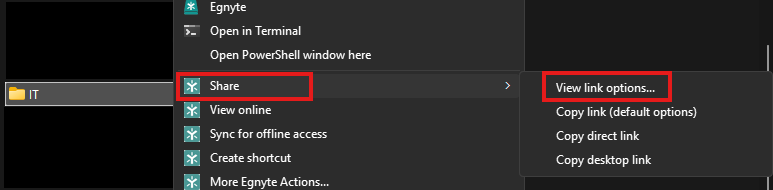
To share Egnyte files/folders externally, right-click the file/folder and select Share > "Copy Link" or "View Link Options". You can also use the "Share" option from the Egnyte Web Client. Default settings for "Copy Link" will allow anyone with the link to access the files, and the link will expire in 7 days. Using "View Link Options" as this allows you to customize access (add a password, set link expiration, enable notifications, add the folder name in the link):
1)
OR

2)

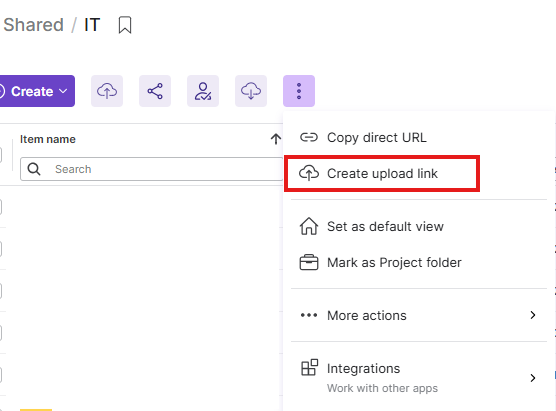
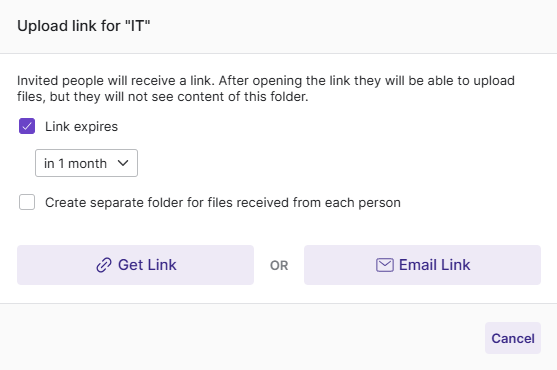
To allow external users to upload, navigate to the desired folder within the Egnyte Web Client and select "More" > "Create upload link". This allows you to specify link expiration and contributor folder options: