



Adobe Acrobat Sign-In Instructions

Oct 28, 2025
 1288
1288
If you find yourself logged out of Adobe, please follow these steps closely.
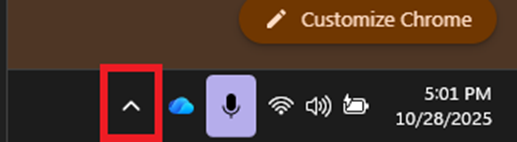
- Go to your “Hidden Icons” – This can be found in the bottom right of your main display.
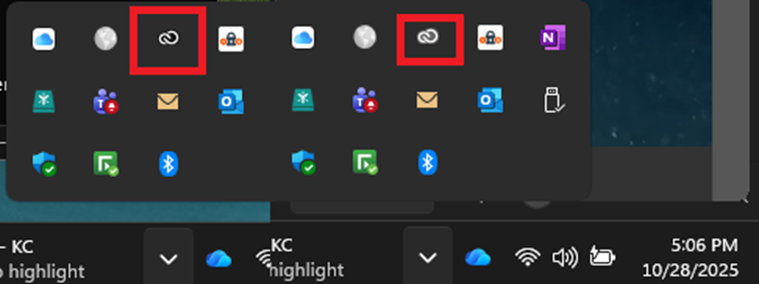
2. Go to the creative cloud icon, if its showing washed out (Right) then you need to log in. Click the creative cloud Icon to pull up the login window.
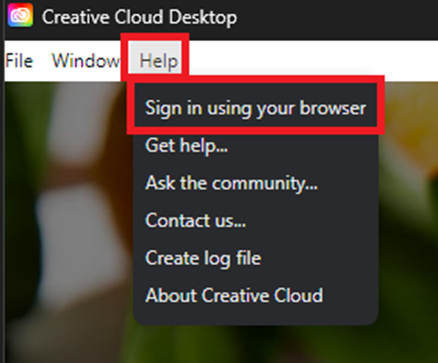
3. When the log-in page appears please locate the HELP button at the top left-hand corner > Then chose “sign-in using your browser”
NOTE - DO NOT sign in via the creative cloud app or you will get a computer not in compliance message.
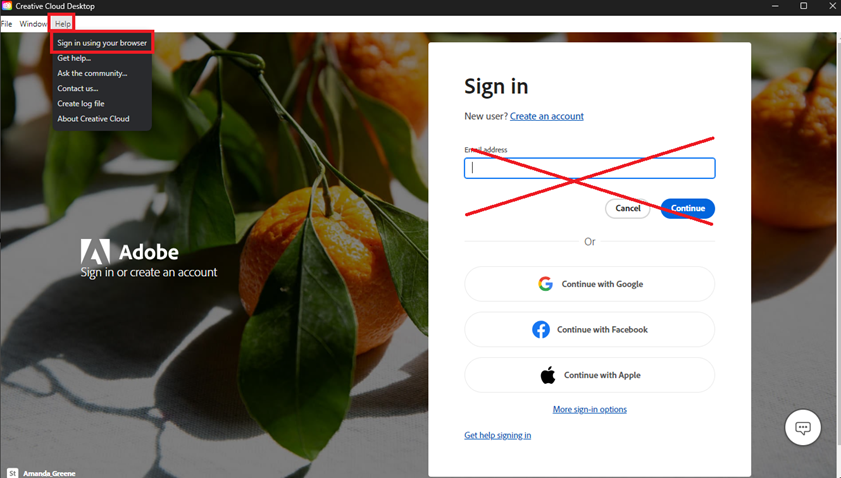
4. This will redirect you to your web browser. Please complete the sign-in process using your Accenture email address at the time of login. Once you have successfully logged in you will be able to use Adobes full functionality.

